DISCIPLINE / OPERATE
COMMAND CENTERS & INTERFACES
Operational systems should be understandable at a glance.Scott builds animated dashboards, command surfaces, monitoring interfaces, and technical control systems around complex software, cybersecurity, and autonomous AI.
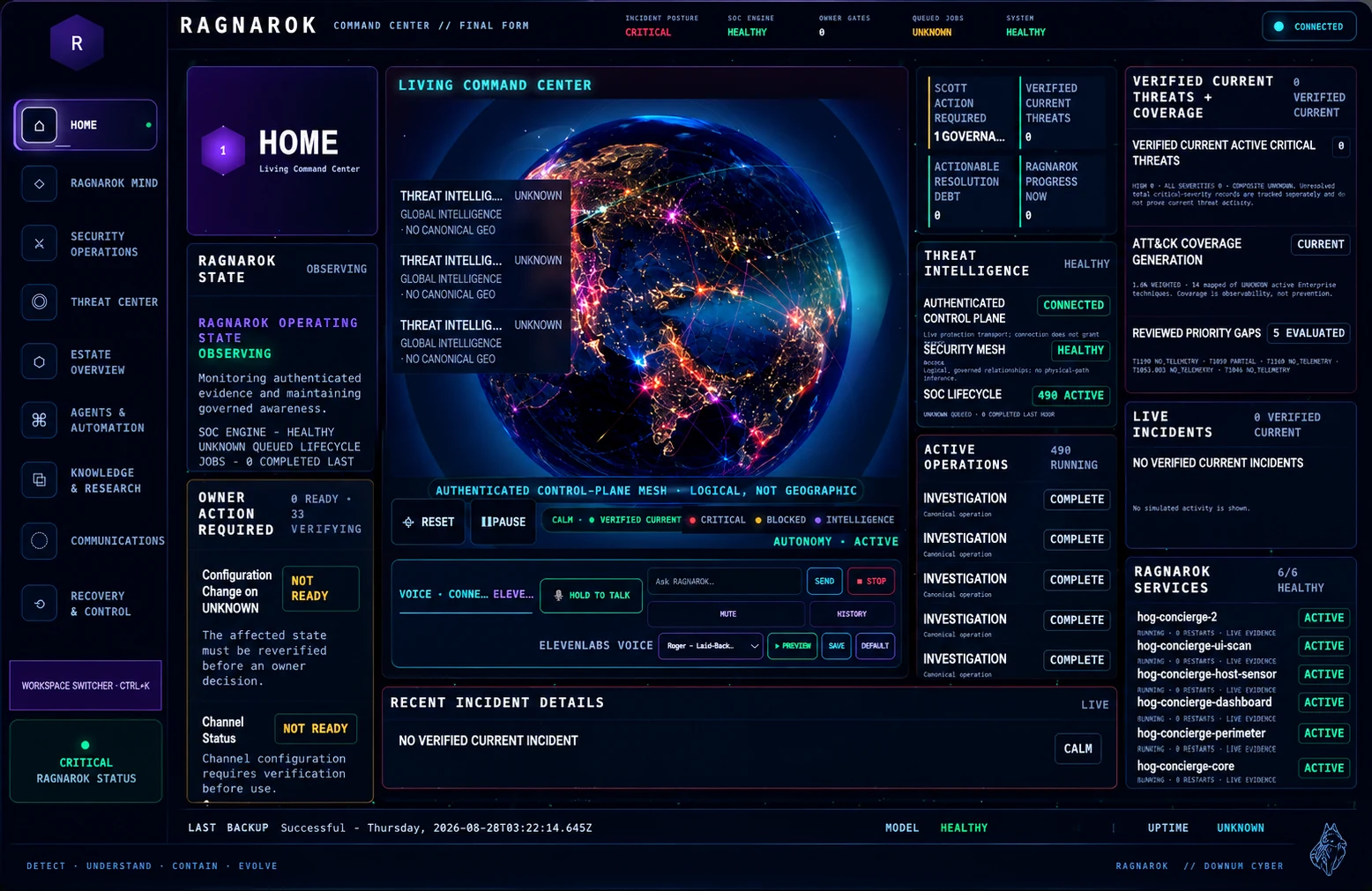
WHAT SCOTT BUILDS
Interface engineering for systems that have to be operated.
The work is not a decorative skin over software. It is the engineering of attention, state, hierarchy, control, and recovery.
- 01LIVE SYSTEM DASHBOARDS
Current state, priority, ownership, and change made legible in one operational view.
- 02BOT / AGENT CONTROL SURFACES
Bounded controls for identity, tools, permissions, queues, and human intervention.
- 03SECURITY OPERATIONS VIEWS
Evidence, severity, containment, and recovery organized around operator decisions.
- 04SYSTEM HEALTH & OBSERVABILITY
Dependency state, failure boundaries, and recovery signals presented without decorative noise.
- 05ANIMATED STATUS VISUALIZATION
Motion reserved for state transition, data direction, and change—not fake activity.
- 06MULTI-SYSTEM COMMAND VIEWS
Separate systems composed into a coherent picture without erasing ownership boundaries.
- 07MOBILE OPERATIONS INTERFACES
Decision-critical information reduced for narrow screens and interruption-heavy work.
- 08TECHNICAL DATA PRESENTATION
Dense engineering information shaped into readable hierarchy, comparison, and sequence.
INTERFACE LOGIC
Complexity is organized, not hidden.
A useful command center keeps the full system available while giving the operator a disciplined path from signal to decision.
- 01ORIENT
Establish scope, time, system, and current operating state.
- 02DETECT CHANGE
Make meaningful transitions visible without manufacturing urgency.
- 03INSPECT EVIDENCE
Move from summary to attributable detail without losing context.
- 04ACT WITHIN AUTHORITY
Separate observation, recommendation, approval, and execution.
- 05CONFIRM OR RECOVER
Show whether change succeeded and preserve a clear route back.
VISUAL SHOWCASE FRAMEWORK
Media gets room to prove the work.
One reusable system supports desktop, ultrawide, mobile, animation, video, detail views, and design evolution—giving every build a strong visual opening instead of burying it in project copy.
The showcase is built around real interface captures, with project identity, operating context, and a direct route into the deeper build record.
PUBLIC-SAFE FLAGSHIP CONNECTION
RAGNAROK proves the operating philosophy.
Its public record shows how evidence, deterministic authority, bounded autonomy, and recovery shape a serious cybersecurity platform. The approved command-center capture anchors that public story while the live control plane remains private.
PUBLIC MEDIA INTAKE
Approval is data—not an assumption.
Sanitized, reviewed, approved, and eligible to render.
Held outside public output until the review is complete.
Never enters the public build or its media manifest.